
New in Kumbukum & browser extension
TL;DR
The Kumbukum Browser Extension v2 is here — it now captures the pages you care about automatically, attaches screenshots, works right beside your inbox with a new email sidepanel, and saves across multiple accounts and workspaces. Inside the app, the Email Command Center got smarter threading, more filters, cleaner inbox tools, a new top search bar, and improved AI chat memory. In short: less context lost, faster to find what matters, and email that finally feels like part of your shared memory.
Kumbukum Browser Extension v2
This is the biggest step yet for the Kumbukum Browser Extension. What started as a quick way to save a link has grown into a full browser companion for your shared memory layer — one that captures the pages you actually care about on its own, enriches them with visual context, and brings Kumbukum right alongside your inbox. Whether you're researching, triaging email, or jumping between workspaces, the extension now keeps your library up to date without ever pulling you out of your flow.
Automatic page capture
You no longer have to remember to save the things you read. The extension now watches how you engage with a page and automatically saves the ones you spend real time on — capturing a page once you've scrolled past the halfway point, so quick glances and passing tabs are ignored while the pages that matter land in your library on their own. Capture is HTTPS-only and ships with sensible default exclusions for email, search engines, and private apps, plus your own exclude list so you stay in full control of what's collected and what's left private.
In-browser screenshots
A saved page now carries more than a URL. The extension can take a screenshot directly in the browser and attach it to the captured page, giving you a visual snapshot of exactly what you were looking at. Months later, when a link's title alone doesn't jog your memory, the image makes it instantly clear why you saved it.
Email sidepanel
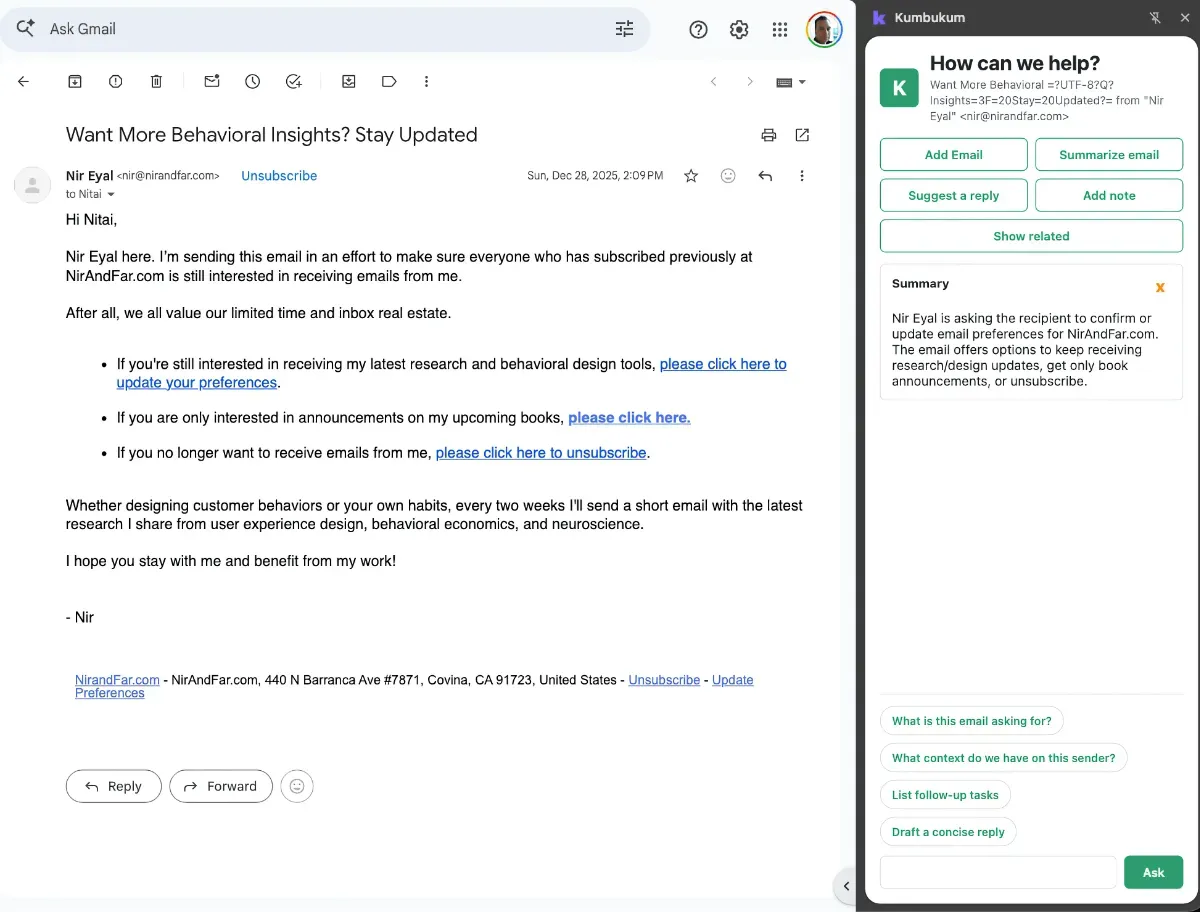
Kumbukum now lives right next to your inbox. The new email sidepanel detects when you open or switch between messages in Fastmail and surfaces the right context in place — letting you write notes, draft reply actions, and tap AI prompt chips to act on a message without ever leaving it. It turns email from something you process separately into another first-class source feeding your shared memory.
Capture across multiple accounts
URL capture has moved into account settings, unlocking far more flexibility for people who work across several workspaces. You can now save the same page into more than one account at once, and switch the active account straight from the pop-up — making it effortless to route the right context to the right place, whether that's Kumbukum Cloud, a self-hosted instance, or several workspaces side by side.
Broader browser support
Capture is now more reliable across more of the web. New vendor-agnostic metadata detection reads page titles and details consistently across sites that structure their data differently, so your saved items come in clean. This release also brings targeted improvements for Vivaldi, alongside the dedicated Chrome / Chromium and Firefox builds the extension already supports.
Latest in Kumbukum
Alongside the extension, Kumbukum itself has seen a wave of improvements — most of them focused on the Email Command Center and on making everything in your workspace faster to find. Together, they turn email into a fully searchable, first-class part of your shared memory and make day-to-day inbox work noticeably smoother.
Top search bar
A new search bar sits at the top of the app and follows you everywhere, so you can jump to a note, email, URL, or memory from any screen without losing your place. Finding the thing you half-remember is now a single keystroke away, no matter where you are in Kumbukum.
Smarter email threading
Email now reads the way you'd expect. Full conversation threads and BCC recipients are parsed correctly, and quoted replies collapse automatically — so a long back-and-forth shows you the new message first instead of burying it under layers of repeated history. Busy threads become clear and easy to follow at a glance.
More ways to filter
In addition to filtering by sender address and domain, you can now narrow your inbox by subject. It's a small change that makes a big difference in large inboxes, letting you slice straight down to the messages you're actually looking for.
Cleaner inbox management
Managing your inbox takes less effort overall. Spam and trashed messages can now be deleted permanently when you're done with them, common actions are available right from the "waiting" label, and trash handling in the email detail view behaves consistently — so clearing out what you don't need is quick and predictable.
Smarter AI chat
AI chat now does a better job of retaining your past conversations, so context carries over from one session to the next. Picking up a thread you started earlier feels natural, and your assistant stays grounded in what you've already discussed.
New to Kumbukum?
Kumbukum is an open-source shared memory layer for teams that use AI. It turns the things you actually work with — notes, files, links, emails, decisions, and project context — into one editable, searchable library that lives in a single place instead of scattered across tabs, inboxes, and chat histories.
What makes it different is that this library is shared and AI-native. Claude, Cursor, ChatGPT, and any other MCP-compatible tool can read from it and write back to it, so every AI session starts already knowing your context instead of asking you to re-explain it. And because it's team-owned, inspectable, and self-hostable, your knowledge stays yours — not locked inside one assistant's private memory.
Teams use Kumbukum to stop repeating themselves, keep AI answers grounded in real company knowledge, and carry context across email, research, code, and support work. Get started free at kumbukum.com.